


Pixel Car Racer
4.525.13K Reviews
App Specs
- Version
- 1.2.5
- Updated On
- License
- Free
- Downloads
- 10,000,000+
- Developer
- Studio Furukawa
- Categories
- Racing
- Platform
- Android, iOS
Screenshots



 Analysis by AppCompare
I judge a racing game by what happens after the first run: whether the controls give me something to learn, whether a small win feels earned, and whether I have a reason to come back for one more attempt. Pixel Car Racer makes that loop revolve around short races and hands-on car tinkering. Its pixel-art presentation sets a nostalgic tone, but the appeal is less about looking backward than about having a car project to refine between races.
That focus makes it a particular kind of mobile racer. I would choose it when I want to experiment with a build and improve through repetition, not when I am looking for a cinematic driving tour or a sprawling world to explore. The important question is whether the little cycle of tuning, racing, earning, and adjusting suits the way you like to play.
How the racing loop earns another run
I like how this game gives a short race a purpose beyond simply finishing it: I can notice a timing mistake, decide what to adjust, and carry that question into the next run. The loop works best when I treat each attempt as a small experiment rather than chasing upgrades blindly. That makes the garage feel like part of the racing, and it sets up the next question: what kind of feedback keeps those retries satisfying?
First action: get on the track, then learn what matters
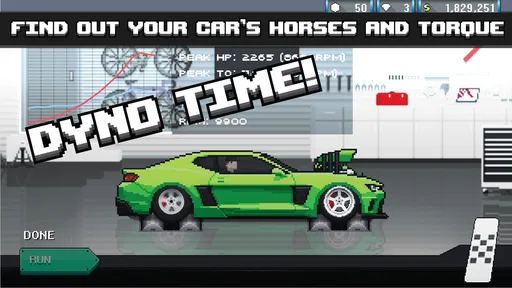
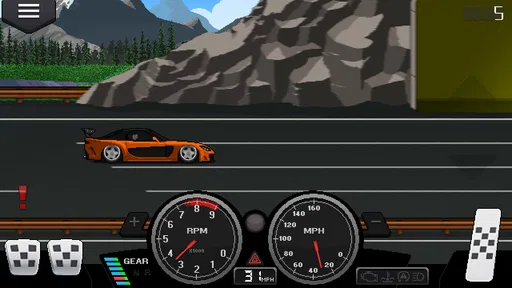
Booting up the game, you’re immediately hit with the charm of those classic 8-bit graphics. It's like stepping back in time, but with all the bells and whistles we love in modern mobile gaming. The interface is straightforward, and I love how the developers have kept it simple yet engaging. It’s got that arcade game vibe that makes you want to dive in and start burning rubber.
The first useful decision is not to treat every race as a test of speed alone. A run is also a way to notice how the car responds and where your timing needs work. If you lose, I find it more satisfying to ask what I can change or do differently than to immediately repeat the same attempt. That small shift turns a quick race into a practical experiment.
For someone picking it up between errands or during a quiet break, that structure is easy to understand: choose a race, concentrate on the driving, then decide whether to make another attempt or spend time in the garage. It does not require me to settle in for a long narrative before the core activity makes sense. The trade-off is that players who want a strong sense of place, story, or exploration may find the race-and-garage routine narrow.
Feedback rhythm: timing matters more than spectacle
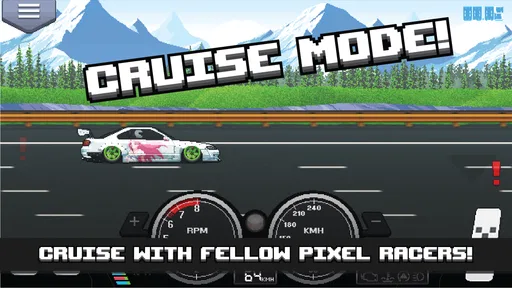
The racing itself is just pure fun. You have drag and street races to conquer, and each one offers a different kind of thrill. Drag racing is all about timing and precision. You need to manage your gear shifts perfectly to get that top speed. Street racing, on the other hand, is a bit more chaotic, with traffic and obstacles adding to the challenge.
Worth Reading Before You Choose

EA SPORTS FC Mobile 26 Is a Bigger Football Game, but It Takes Time

Flipboard Shows What News Apps Must Do Beyond the Feed

Switching to Android Auto Means Rethinking Your Driving Routine

Google Calendar Makes a Crowded Week Easier to Manage

Ludo King Makes the Most of the Minutes Between Plans

Baby Panda World Brings Quick Play to Modern Phones, but Its Game Library Feels Busy
That contrast gives the game a useful change of pace. Drag racing makes me focus on a repeatable sequence: watch the run, shift with care, and see whether the result improves. Street racing asks for more attention to what is happening around the car. If I have only a moment to play, the focused feel of a drag run is easier to approach; when I want a less predictable challenge, the street format gives me a different problem to solve.
The controls are pretty intuitive. You’ve got your gas, brake, and gear shifters, and it doesn’t take long before you’re drifting around corners like a pro. The learning curve isn’t steep, which makes it accessible for players of all ages. But mastering it? That’s a different story.
In practice, that gap between getting started and becoming consistent is where the game can hold my attention. A simple control layout does not mean every run is automatic: timing and attention still matter. I would give myself a few races to learn the feel before deciding that a car or setup is the problem. Changing several things at once makes it harder to tell which adjustment actually helped.
Reward: turn garage time into a useful choice
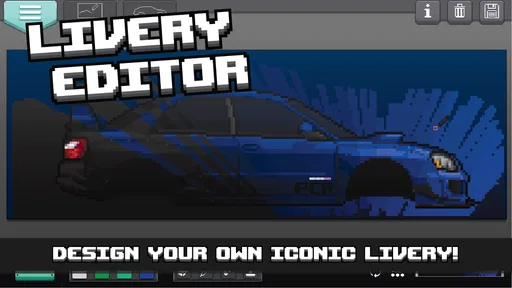
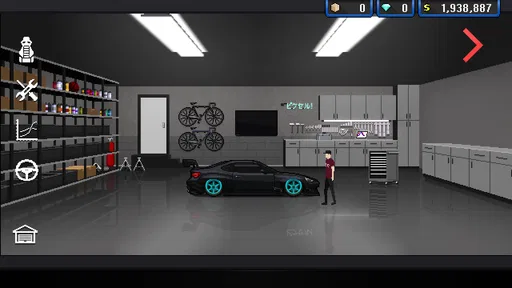
One of the standout features of Pixel Car Racer is the intense level of customization. I mean, you can tweak just about everything on your car. From the engine to the paint job, the possibilities are endless. I spent way too much time just trying out different combinations. The game offers a huge selection of parts and upgrades, which means you can truly make your car your own.
What I found particularly cool is the ability to build your car from scratch. You start small, but as you progress, the upgrades become more advanced. The game rewards you for your time and effort, and there’s nothing quite like taking a fully customized beast onto the track.
The practical trick is to keep a clear reason for each garage visit. I like to identify one thing I want to improve, make a focused change, and then take the car back out to see how it feels. That makes customization more than decoration and keeps the reward tied to driving. If I alter everything at once, I lose the useful feedback that tells me whether the new setup is actually better for my style.
There are two different kinds of satisfaction here: getting a car to look the way I want and making choices that support how I race. They can overlap, but they are not the same goal. A player who loves visual self-expression can enjoy the garage even when they are not chasing a better result; someone focused on performance may prefer to spend time testing rather than endlessly changing appearances. Knowing which side matters more to you helps keep the upgrade loop enjoyable instead of turning it into busywork.
Session reset: leave yourself a reason to return
After a race, the natural reset is to decide what comes next: try the same kind of event again, switch to the other racing style, or spend a moment on the car. I find that works best when I stop with a small, specific goal in mind, such as practicing a cleaner shift or testing one change. Then a later session has a clear starting point rather than feeling like I have to rebuild my plan from scratch.
A realistic use case is a short evening break. I can play a couple of runs, notice that my timing needs work, and put the phone down without needing to finish a long sequence. On a longer session, I can alternate racing and customization, but I would still avoid making every run feel like a grind for the next upgrade. The loop is strongest when each attempt teaches me something, not when I am repeating races without paying attention.
This also answers whether it works for casual play: the straightforward races make it approachable in brief bursts, while the tuning gives more committed players something to think about over time. It is less suitable if you want every session to deliver a new track, a big story beat, or a dramatic change in scenery. The repetition is part of the design appeal, but it is also the main reason some players may lose interest.
Where it fits among racing games
Compared with the usual mobile racers built around polished 3D presentation and a sense of speed through elaborate environments, this one puts more weight on timing, car-building, and its pixel look. I would pick it over a more spectacle-driven racer when I want a compact challenge and the freedom to fuss over a car. I would choose a broader, visually realistic racing game instead if I wanted to feel immersed in different locations or focus on steering through long courses.
That is not a claim that one approach is better for everyone. The pixel style is a clear part of the identity, and the two race types give the driving a different feel without changing the basic loop. But if you dislike retro visuals, want a deep simulation of real-world driving, or expect a large open road to explore, the game is probably not the right match. Its strengths are specific, and they are most apparent when you enjoy repeated attempts and hands-on customization.
Practical details before you commit
Studio Furukawa’s game is a free racing title, with optional in-app purchases priced from $0.99 to $9.99 per item. I would start without spending: the appeal is in racing and gradually working on a car, and paying is best treated as an optional shortcut rather than a requirement. If you are prone to buying upgrades whenever progress slows, decide on a budget before you begin. That keeps a moment of impatience from becoming the reason you spend.
The game is rated Everyone and requires Android 4.1 or later. It launched on July 22, 2016, and version 1.2.5 is the current version. Those details make it accessible to a wide range of Android users, but the age rating alone does not tell me whether the racing style will suit a particular player. A child who enjoys cars and short challenges may find the basics approachable, while someone who wants a guided campaign may need a different kind of game.
Its audience is substantial: it has more than 10 million installs and an average rating of 4.5 from around 377,000 ratings, alongside roughly 25,000 written reviews. I read that as evidence that the core idea has found a large audience, not as a guarantee that every player will enjoy the repetition. The best way to decide is to ask whether tuning and retrying sounds satisfying to you.
The community, without relying on it
What really adds to the experience is the community around the game. There are tons of forums and groups where players share tips, car builds, and even race strategies. Joining these communities can really enhance your gameplay experience, and it’s a great way to show off your custom rides.
I would treat outside tips as inspiration rather than instructions. A build that suits another player’s priorities may not suit the way I approach a race, and copying a setup without understanding its purpose can make it harder to learn from my own runs. When I do look for advice, I would focus on one question at a time—such as how another player thinks about a particular style of racing—then test the idea for myself.
The original article described the developers as active and responsive to feedback. I would not make future updates the reason to start playing, though. The decision is easier if the current mix of racing and customization already appeals to you; community discussion can add ideas, but it should not be needed to make the basic loop enjoyable.
Sound, setting, and everyday comfort
Now, let’s talk about the sound. The retro soundtrack is spot on. It perfectly complements the pixelated graphics and adds to the overall arcade vibe of the game. The sound effects, from the revving of the engines to the squeal of the tires, are satisfyingly nostalgic.
It’s like having your own mini arcade in your pocket. Just plug in those headphones, and you’re good to go.
That sound-and-style pairing helps the game feel coherent: the pixel presentation and arcade audio point in the same direction instead of competing for attention. For a quick session in a shared room, headphones can make the experience more personal, but the visual style still carries much of the game’s character on its own. If you prefer a realistic engine soundtrack or understated presentation, this deliberately retro mood may not be your taste.
Spending and the value of patience
As with most mobile games, Pixel Car Racer does have in-app purchases. You can buy currency to speed up your progress or get those premium parts quicker. While not strictly necessary, they do offer a way to enhance your experience if you’re willing to spend a bit of cash. Personally, I enjoyed grinding through the races to earn upgrades, but the option is there if you’re feeling impatient.
Overall, they’ve balanced it well so that you can still have a great time without spending money.
My advice is to treat earning upgrades as part of the game rather than a barrier you need to pay your way past. If a particular improvement feels out of reach, take a break from chasing it and return to the driving with a smaller goal. That gives you a fairer sense of whether the game itself is fun for you. Spending may speed things along, but it cannot replace the satisfaction of learning the timing or choosing a build that feels right.
Loop verdict: who should take the wheel
All in all, Pixel Car Racer is a delightful mix of old-school charm and modern-day gaming mechanics. It’s a game that caters to both casual players and hardcore racers. Whether you’re in it for the racing or the customization, there’s plenty to keep you entertained. Plus, the community aspect adds an extra layer of engagement that keeps you coming back for more.
If you haven’t tried it yet, give it a spin. It’s a ride worth taking, especially if you love a bit of pixelated nostalgia mixed with high-speed excitement.
I would especially recommend it to players who enjoy setting a small goal, repeating a race with more care, and taking the result back to the garage. It is easy to dip into, but the deeper satisfaction comes from paying attention to what each run teaches you. If you want a game that rewards patience and personal experiments more than visual spectacle, this is a strong fit.
I would skip it if you need constant novelty, realistic presentation, or a sense of progression driven by a long campaign. Those are reasonable preferences, but they point toward a different kind of racer. Here, the next session begins because there is another shift to nail, another setup to test, or another detail to change—not because the game promises a wholly new experience every time. That focused loop is the reason I would keep it installed, provided that is the kind of racing you actually enjoy.
Pros
- Highly customizable car builds
- Engaging retro-style graphics
- Intuitive controls
- Diverse racing modes
- Regular updates enhance gameplay
Cons
- In-app purchases are costly
- Limited storyline depth
- Occasional crashes reported
- Graphics may feel dated
- Requires internet for full features
FAQs for Pixel Car Racer
What is Pixel Car Racer?
Pixel Car Racer is a retro-style arcade racing game available on both Android and iOS platforms. It combines the thrill of racing with RPG elements, allowing players to customize their cars extensively. With an 8-bit aesthetic, it appeals to fans of nostalgic gaming experiences.
Is Pixel Car Racer free to download and play?
Yes, Pixel Car Racer is free to download and play on both Android and iOS devices. However, the game includes in-app purchases that allow players to buy in-game currency and other enhancements. These purchases can speed up progress and enhance the gaming experience.
What are the main features of Pixel Car Racer?
Pixel Car Racer features a vast array of customization options, allowing players to modify their cars with different parts and paint jobs. It includes various modes such as Drag and Street racing. Players can also participate in tournaments and daily challenges to earn rewards and improve their skills.
Does Pixel Car Racer require an internet connection?
Pixel Car Racer can be played offline, making it convenient for users who may not always have access to an internet connection. However, certain features, such as online leaderboards and updates, require an internet connection to function properly.
Are there any age restrictions for playing Pixel Car Racer?
Pixel Car Racer is generally suitable for players of all ages due to its non-violent content and simple controls. However, it is recommended for players aged 12 and up due to the complexity of customization and strategy involved in the gameplay. Parents should be aware of in-app purchases.


